Programming in C: Unit V: File processing
Writing Data From Files
Syntax with Example C Programs
C provides the following set of functions to read data from a file: • fprintf(), • fputs(), • fputc(), • fwrite().In this section, we will read about these functions.
WRITING
DATA TO FILES
C
provides the following set of functions to read data from a file:
•
fprintf()
•
fputs()
•
fputc()
• fwrite()
In
this section, we will read about these functions.
fprintf()
The
fprintf() is used to write formatted output to stream. The syntax of the
fprintf() can be given as
int fprintf (FILE * stream, const
char * format, ...) ;
The
function writes data that is formatted as specified by the format argument to
the specified stream. After the format parameter, the function can have as many
additional arguments as specified in format.
The
parameter format in the fprintf() is nothing but a C string that contains the
text that has to be written on to the stream. Although not mandatory, the
fprintf() can optionally contain format tags, that are replaced by the values
specified in subsequent additional arguments and are formatted as requested.
Note
There
must be enough arguments for format because if there are not, then result will
be completely unpredictable. However, if by mistake you specify more number of
arguments, the excess arguments will simply be ignored.
The
prototype of the format tag can be given as
% [flags] [width] [.precision]
[length] specifier
Each
format specifier must begin with a % sign. The % sign is followed by:
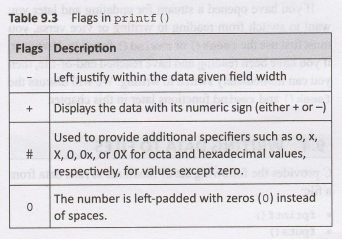
Flags
which specifies output justification such as decimal point, numerical sign,
trailing zeros, or octal or hexa- decimal prefixes. Table 9.3 shows the
different types of flags with their description.
Width
specifies the minimum number of characters to print after being padded with
zeros or blank spaces.
Precision
specifies the maximum number of characters to print.
•
For integer specifiers (d, i, o, u, x, X): precision flag specifies the minimum
number of digits to be written. However, if the value to be written is shorter
than this number, the result is padded with leading zeros. Otherwise, if the
value is longer, it is not truncated.
•
For character strings, precision specifies the maximum number of characters to
be printed.
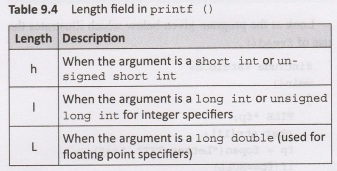
Length
field can be explained as given in Table 9.4.
Specifier
is used to define the type and the interpretation of the value of the
corresponding argument.
The
fprintf() may contain some additional parameters as well depending on the
format string. Each argument must contain a value to be inserted instead of each%
tag specified in the format parameter, if any. In other words, the number of
arguments must be equal to the number of % tags that expect a value.
Look
at the program given below which demonstrates the use of fprintf().
#include <stdio.h>
main()
{
FILE *fp;
int i;
char name [20];
float salary;
fp = fopen("Details.TXT",
"w");
if (fp==NULL)
{
printf("\n The file could not
be opened");
exit(1);
}
for (i=0;i<10;i++)
{
puts ("\n Enter your name:
");
gets (name);
fflush(stdin);
puts("\n Enter your salary:
");
scanf("%f", &salary);
fprintf(fp, " (%d) NAME:
[%-10.10s] \t SALARY %5.2f", i, name, salary);
}
fclose(fp);
}
Programming Tip:
If
you open a file for writing using w mode, then the contents of the file will be
deleted. If a file has to be used for reading as well as writing, then it must
be opened in w+ mode.
Output
Enter your name: Aryan
Enter your salary: 50000
Enter your name: Anshita
Enter your salary: 65000
Enter your name: Saesha
Enter your salary: 70000
This
example asks the user to enter the name and salary of 10 people. Each time the
user enters the name and salary, the data read is written to Details. TXT. The
names are written on new lines in the file. In this example, we have used three
format tags:
•
%d to specify a signed decimal integer.
•
%-10.10s. Here - indicates that the characters must be left aligned. There can
be minimum of 10 characters as well as maximum of 10 characters (.10) in the
strings.
•
%f to specify a floating point number.
If
you want to use fprintf () to write on the screen, then specify stdout instead
of specifying any other file pointer.
fputs()
The
opposite of fgets() is fputs (). The fputs () is used to write a line to a
file. The syntax of fputs() can be given as
int fputs (const char *str, FILE
*stream);
The
fputs() writes the string pointed to by str to the stream pointed to by stream.
On successful completion, fputs() returns 0. In case of any error, fputs()
returns EOF.
#include <stdio.h>
main()
{
FILE *fp;
char feedback [100];
fp =
fopen("Comments.TXT", "w");
if (fp==NULL)
{
printf("\n The file could not
be opened");
exit (1);
}
printf("\n Provide feedback on
this book: ");
gets (feedback);
fflush(stdin);
// feedback stored
fputs (feedback, fp);
fclose(fp);
}
Output
Provide feedback on this book: good
fputc()
The
fputc() is just the opposite of fgetc () and is used to write a character to
the stream.
int fputc(int c, FILE *stream);
The
fputc() function will write the byte specified by C (converted to an unsigned
char) to the output stream pointed to by stream. On successful completion,
fputc() will return the value it has written. Otherwise, in case of error, the
function will return EOF and the error indicator for the stream will be set.
#include <stdio.h>
main()
{
FILE *fp;
char feedback [100];
int i;
fp = fopen("Comments.TXT",
"w");
if (fp==NULL)
{
printf("\n The file could not
be opened");
exit (1);
}
printf("\n Provide feedback on
this book: ");
gets (feedback);
for (i=0;i< feedback [i]; i++)
fputc (feedback [i], fp);
fclose(fp);
}
Output
Provide feedback on this book: good
Note
The
standard file stdout is buffered in case the output unit is not the terminal.
On the contrary, the standard file stderr is usually unbuffered. However, the
settings of stdout and stderr can be changed using setbuf.
When
an output stream is unbuffered, information appears on the destination device
as soon as it is written. When it is buffered, characters are saved internally
and then written out as a group. In order to force buffered characters to be
output before the buffer is full, use the fflush().
Programming Tip:
EOF
is an integer type defined in stdio.h and has a value '–1'.
fwrite()
The
fwrite() is used to write data to a file. The syntax of fwrite can be given as
int fwrite (const void *str, size t
size, size_t count, FILE *stream);
The
fwrite() function will write objects (number of objects will be specified by
count) of size specified by size, from the array pointed to by ptr to the
stream pointed to by stream.
The
file-position indicator for the stream (if defined) will be advanced by the
number of bytes successfully written. If an error occurs, the resulting value
of the file- position indicator for the stream is unspecified.
On
successful completion, the fwrite() function returns the number of objects
successfully written. The number of objects will be less than count if an error
is encountered. If size or count is 0, fwrite() will return o and the contents
of the stream remains unchanged. In case of error, the error indicator for the
stream will be set.
#include <stdio.h>
#include <string.h>
#include <stdlib.h>
main (void)
{
FILE *fp;
size_t count;
char str[] = "GOOD
MORNING";
fp = fopen("Welcome.txt",
"wb");
if (fp==NULL)
{
printf("\n The file could not
be opened");
exit(1);
}
count = fwrite(str, 1, strlen(str),
fp);
printf("\n %d bytes were written
to the file", count);
fclose(fp);
return 0;
}
Output
13 bytes were written to the file
Note
fwrite()
can be used to write characters, integers, or structures to a file. However,
fwrite() can be used only with files that are opened in binary mode.
Programming in C: Unit V: File processing : Tag: : Syntax with Example C Programs - Writing Data From Files
Programming in C: Unit V: File processing
Under Subject
Programming in C
CS3251 2nd Semester CSE Dept 2021 | Regulation | 2nd Semester CSE Dept 2021 Regulation
Related Subjects

Professional English II
HS3251 2nd Semester 2021 Regulation | 2nd Semester Common to all Dept 2021 Regulation

Statistics and Numerical Methods
MA3251 2nd Semester 2021 Regulation M2 Engineering Mathematics 2 | 2nd Semester Common to all Dept 2021 Regulation

Engineering Graphics
GE3251 eg 2nd semester | 2021 Regulation | 2nd Semester Common to all Dept 2021 Regulation

Physics for Electrical Engineering
PH3202 2nd Semester 2021 Regulation | 2nd Semester EEE Dept 2021 Regulation

Basic Civil and Mechanical Engineering
BE3255 2nd Semester 2021 Regulation | 2nd Semester EEE Dept 2021 Regulation

Electric Circuit Analysis
EE3251 2nd Semester 2021 Regulation | 2nd Semester EEE Dept 2021 Regulation

Physics for Electronics Engineering
PH3254 - Physics II - 2nd Semester - ECE Department - 2021 Regulation | 2nd Semester ECE Dept 2021 Regulation

Electrical and Instrumentation Engineering
BE3254 - 2nd Semester - ECE Dept - 2021 Regulation | 2nd Semester ECE Dept 2021 Regulation

Circuit Analysis
EC3251 - 2nd Semester - ECE Dept - 2021 Regulation | 2nd Semester ECE Dept 2021 Regulation

Materials Science
PH3251 2nd semester Mechanical Dept | 2021 Regulation | 2nd Semester Mechanical Dept 2021 Regulation

Basic Electrical and Electronics Engineering
BE3251 2nd semester Mechanical Dept | 2021 Regulation | 2nd Semester Mechanical Dept 2021 Regulation

Physics for Civil Engineering
PH3201 2021 Regulation | 2nd Semester Civil Dept 2021 Regulation

Basic Electrical, Electronics and Instrumentation Engineering
BE3252 2021 Regulation | 2nd Semester Civil Dept 2021 Regulation

Physics for Information Science
PH3256 2nd Semester CSE Dept | 2021 Regulation | 2nd Semester CSE Dept 2021 Regulation

Basic Electrical and Electronics Engineering
BE3251 2nd Semester CSE Dept 2021 | Regulation | 2nd Semester CSE Dept 2021 Regulation
Programming in C
CS3251 2nd Semester CSE Dept 2021 | Regulation | 2nd Semester CSE Dept 2021 Regulation