Object Oriented Programming: Unit II: Inheritance, Packages and Interfaces
Implementation of Different Type of Inheritance
Syntax with Example Java Programs
The class which is inherited is called the base class or the superclass and the class that does the inheriting is called the derived class or the subclass.The method defined in base class can be used in derived class.
Implementation of Different
Types of Inheritance
Single Inheritance
• The
class which is inherited is called the base class or the superclass and the
class that does the inheriting is called the derived class or the subclass.
• The
method defined in base class can be used in derived class. There is no need to
redefine the method in derived class. Thus inheritance promotes software reuse.
• The
subclass can be defined as follows -
class
nameofSubclass extends superclass
{
variable
declarations
method
declarations
}
Note
that the keyword extends represents that the properties of superclass are
extended to the subclass. Thus the subclass will now have both the properties
of its own class and the properties that are inherited from superclass.
• Following
is a simple Java program that illustrates the concept of single inheritance -
Java
Program[InheritDemo1.java]
class A
{
int a;
void
set_a(int i)
{
a=i;
}
void
show_a()
{
System.out.println("The
value of a= "+a);
}
}
class B
extends A //extending the base class A
{
int b;
void
set_b(int i)
{
b=i;
}
void
show_b()
{
System.out.println("The
value of b= "+b);
}
void
mul()
{
int c;
c=a*b;
System.out.println("
The value of c= "+c);
}
}
class
InheritDemo1
{
public
static void main(String args[])
{
A
obj_A=new A();
B
obj_B=new B();
Note
that object of class B is accessing method of class A
obj_B.set_a(10);
obj_B.set_b(20);
obj_B.show_a();
obj_B.show_b();
obj_B.mul();
}
}
Output
F:\test>javac
InheritDemo1.java
F:\test>java
Inherit Demo1
The
value of a= 10
The
value of b= 20
The
value of c= 200
Program
Explanation
In above
program, we have created two classes: class A and B. In class A we have
declared one integer a and in class B we have declared an integer b. There are
two methods defined in class A namely: set_a and show_a. Similarly, in class B
there are two methods defined namely: set_b and show_b. As the name suggests
these methods are for setting the values and for showing the contents.
In the
class InheriDemo1, in the main function we have created two objects for class A
and class B. The program allows us to access the variable a (belonging to class
A) and the variable b (belonging to class B) using the object for class B. Thus
it is said that class B has inherited value of variable a.

The
class A is called Superclass and the class B is called Subclass. A Superclass
is also called as parent class or base class. Similarly, the Subclass is also
called as child class or derived class.
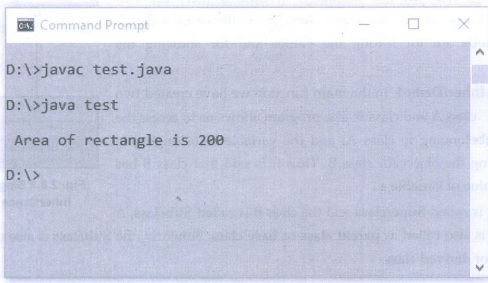
Ex. 2.8.1 : Write a java program
to calculate area of rectangle using the single inheritance.
Sol.
:
class
Shape
{
int
len,br;
void
setValues(int a,int b)
{
len=a;
br=b;
}
}
class
Rectangle extends Shape
{
int
area()
{
return
len*br;
}
}
class
test
{
public
static void main(String args[])
{
Rectangle
r=new Rectangle();
r.setValues(10,20);
System.out.println("\n
Area of rectangle is "+r.area());
}
}
Output
Multilevel Inheritance
The
multilevel inheritance is a kind of inheritance in which the derived class
itself derives the subclasses further.
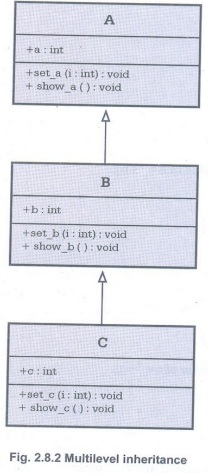
In the
following program, we have created a base class A from which the subclass B is
derived. There is a class C which is derived from class B. In the function main
we can access any of the
field in
the class hierarchy by creating the object of class C.
Java
Program[MultiLvilnherit.java]
class A
{
int a;
void
set_a(int i)
{
a=i;
}
void
show_a()
{
System.out.println("The
value of a= "+a);
}
}
class B
extends A
{
int b;
void
set_b(int i)
{
b=i;
}
void
show_b()
{
System.out.println("The
value of b= "+b);
}
class C
extends B
{
int c;
void
set_c(int i)
{
c=i;
}
void
show_c()
{
System.out.println("The
value of c= "+c);
}
void
mul()
{
int ans;
ans=a*b*c;
System.out.println("
The value of ans = "+ans);
}
}
class
MultiLvlInherit
{
public
static void main(String args[])
{
A
obj_A=new A();
B
obj_B=new B();
C
obj_C=new C();
obj_C.set_a(10);
obj_C.set_b(20);
obj_C.set_c(30);
obj_C.show_a();
obj_C.show_b();
obj_C.show_c();
obj_C.mul();
}
}
Output
The
value of a= 10
The
value of b= 20
The
value of c= 30
The
value of ans= 6000
Ex. 2.8.2 Declare a class called
employee having employee_id and employee_name as members. Extend class employee
to have a subclass called salary having designation and monthly_salary as
members. Define following:
Required constructors.
A method to find and display all
details of employees drawing salary more than 20000/-.
Method main for creating an array
for storing these details given as command line argumentsand showing usage of
above methods.
Sol. :
class
employee
{
int
employee_id;
String
employee_name;
}
class
salary extends employee //derived class
{
String
designation;
double
monthly_salary;
salary()
//default constructor
{}
salary(int
employee_id,String employee_name,String designation, double monthly_salary)
//parameterised consruct.
{
this.employee_id
= employee_id;
this.employee_name
= employee_name;
this.designation
= designation;
this.monthly_salary
= monthly_salary;
}
void
fun(String emp[][]) //Function displaying salary>20000
{
for(int
i=0;i<emp.length;i++)
{
if(
(Double.parseDouble(emp[i][3])) > 20000)
{
System.out.println("\nEmployee
Drawing Salary More than 20000/- :");
System.out.println("Id
= "+emp[i][0]);
System.out.println("Name
= "+emp[i][1]);
System.out.println("Designation
= "+emp[i][2]);
System.out.println("Salary
= "+emp[i][3]);
System.out.println("--------------------------------");
}
}
}
}
public
class employeetest
{
public
static void main(String args[])
{
salary
obj[] = new salary[5];
String
Details[][];
obj[0] =
new salary(1,"AAA","Accountant", 12000);
obj[1] =
new salary(2, "BBB","Manager", 30000);
obj[2] =
new salary(3,"CCC","Executive", 2000);
obj[3] =
new salary(4, "DDD","CEO",50000);
obj [4] =
new salary();
try
{
obj[4].employee_id
= Integer.parseInt(args[0]);
obj
[4].employee_name = args[1];
obj
[4].designation = args[2];
obj
[4].monthly_salary = Double.parseDouble(args[3]);
}
catch(NumberFormatException
e)
{
System.out.println("Exception:
"+e);
}
Details
= new String[obj.length][4];
for(int
i=0;i<obj.length;i++)
{
Details[i][0]
= String.valueOf(obj[i].employee_id);
Details[i][1]
= obj[i].employee_name;
Details[i][2]
= obj[i].designation;
Details[i][3]
= String.valueOf(obj[i].monthly_salary);
}
obj
[4].fun(Details);
}
}
Output
E:\test>javac
employeetest.java
E:\test>java
employeetest 5 EEE Manager 20000
Employee
Drawing Salary More than 20000/- :
Id = 2
Name =
BBB
Designation
= Manager
Salary =
30000.0
-------------------------------------------
Employee
Drawing Salary More than Rs. 20000/- :
Id = 4
Name DDD
Designation
= CEO
Salary =
50000.0
-------------------------------------------
Ex. 2.8.3 Create a Java class
Shape with constructor to initialize the one parameter "dimension".
Now create three subclasses of Shape with following methods:
(i) n"Circle" with
methods to calculate the area and circumference of the circle with dimension as
radius.
(ii) "Square" with
methods to calculate the area and length of diagonal of square with dimension
as length of one side.
(iii) "Sphere" with
methods to calculate the volume and surface area of sphere with dimension as
radius of the sphere. Write appropriate main method to create object of each
class and test every method
Sol.:
class
Shape
{
double
dimension;
Shape()
{
dimension=0;
}
}
class
Circle extends Shape
{
Circle(double
r)
{
dimension
= r;
}
void
display()
{
System.out.println("------------------------------");
System.out.println("The
radius of circle is: "+dimension);
}
double
area()
{
System.out.print("Area
Of Circle: ");
return
(3.14* dimension* dimension);
}
double
circum()
{
System.out.print("Circumference
Of Circle: ");
return
(2*3.14* dimension);
}
}
class
Square extends Shape
{
Square
(double d)
{
dimension
= d;
}
void
display()
{
System.out.println("---------------------------------");
System.out.println("The
side of square is: "+dimension);
}
double
area()
{
System.out.print("Area
Of Square: ");
return
(dimension* dimension);
}
double
LenDiagonal()
{
System.out.print("Length
of Diagonal of Square: ");
return
(dimension* Math.sqrt(2));
}
}
class
Sphere extends Shape
{
Sphere(double
r)
{
dimension
= r;
}
void
display()
{
System.out.println("------------------------------------");
System.out.println("The
radius of sphere is: "+dimension);
}
double
area()
{
System.out.print("Surface
Area Of Sphere: ");
return
(4*3.14*dimension* dimension);
}
double
volume()
{
System.out.print("Volume
of Sphere: ");
return
((4/3)*3.14* dimension* dimension* dimension);
}
}
class
InheritanceDemo
{
public
static void main(String args[])
{
Circle
cir = new Circle(10);
cir.display();
System.out.println(cir.area());
System.out.println(cir.circum());
Square
sq = new Square(10);
sq.display();
System.out.println(sq.area());
System.out.println(sq.LenDiagonal());
Sphere
sph = new Sphere(10);
sph.display();
System.out.println(sph.area());
System.out.println(sph.volume());
}
}
Output
---------------------------------------------
The
radius of circle is: 10.0
Area Of
Circle: 314.0
Circumference
Of Circle: 62.800000000000004
--------------------------------------------
The side
of square is: 10.0
Area Of
Square: 100.0
Length
of Diagonal of Square: 14.142135623730951
--------------------------------------------
The
radius of sphere is: 10.0
Surface
Area Of Sphere: 1256.0
Volume
of Sphere: 3140.0
Review
Questions
1. What
is inheritance? Write a program for inheriting a class.
2.What
is inheritance? With diagrammatic illustrations and Java programs illustrate
different types of inheritance. Give self explanatory comments in your program.
3.
Define Inheritance. With diagrammatic illustration and java programs illustrate
the different types of inheritance with an example.
Object Oriented Programming: Unit II: Inheritance, Packages and Interfaces : Tag: : Syntax with Example Java Programs - Implementation of Different Type of Inheritance
Related Topics
Related Subjects
Object Oriented Programming
CS3391 3rd Semester CSE Dept | 2021 Regulation | 3rd Semester CSE Dept 2021 Regulation